

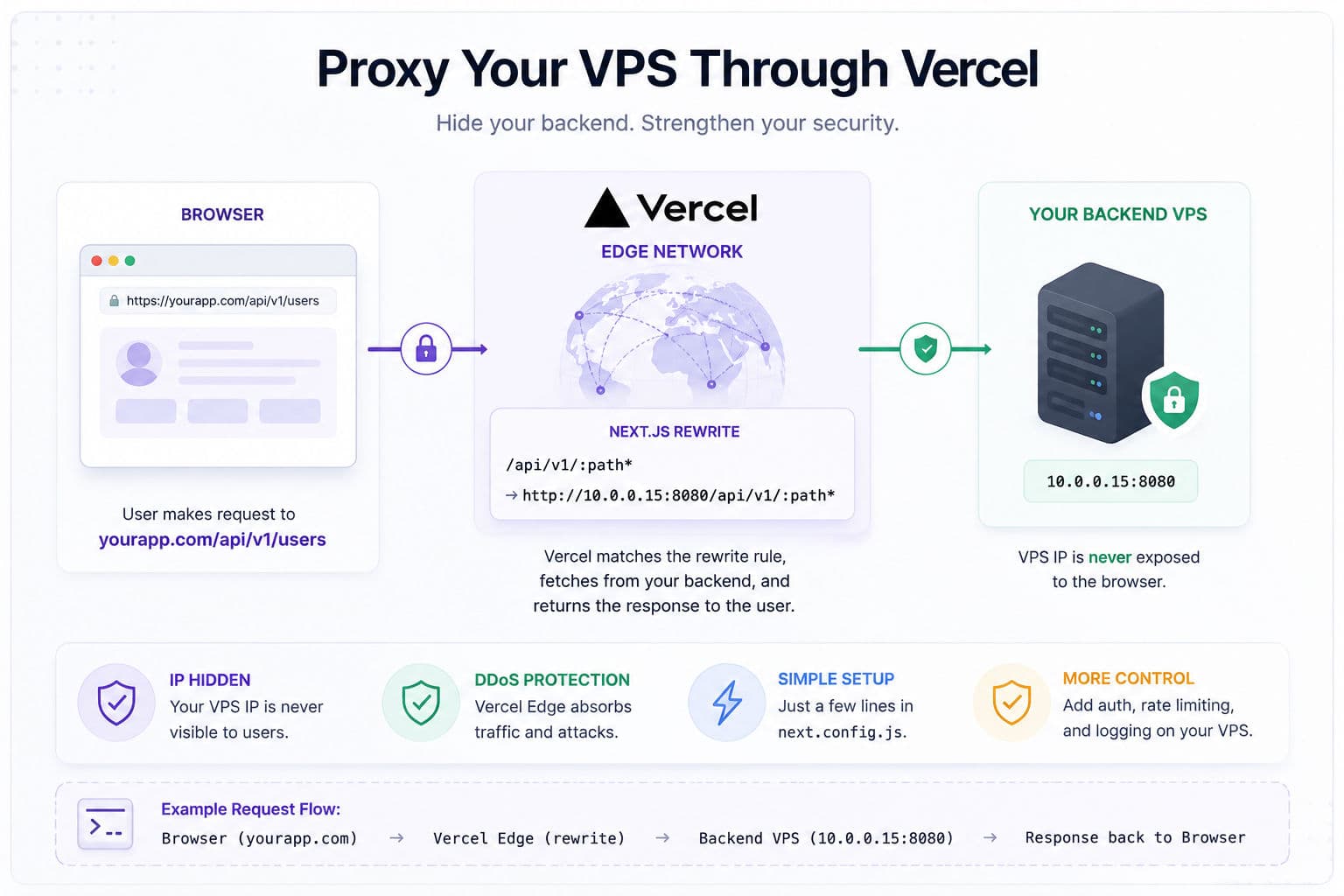
If your Next.js frontend lives on Vercel and your backend lives on a VPS somewhere, there’s a decent chance every API call is going directly to your VPS’s public IP or domain—visible in the browser’s Network tab to anyone who bothers to look. That’s a bigger deal than most devs realize: exposed IPs get scraped by port scanners within minutes, and a direct path to your VPS bypasses Vercel’s DDoS mitigation entirely. Next.js rewrites fix this with roughly five lines of config.
Here’s when it’s worth doing, how to actually set it up, and the sharp edges I’ve hit that the “quick tutorial” version never mentions.
1. Why the exposed IP is a real problem
When a browser makes a request to https://myvps.example.com/api/users, that hostname resolves to a public IP. That IP is now in the browser’s Network tab, in your JS bundle, and potentially in your error tracking logs—all of which are readable by anyone with DevTools. Shodan and similar scanners will find open ports on that IP within hours of it going live.
The practical risks:
- Direct DDoS: Attackers bypass Cloudflare or Vercel entirely and hammer your VPS directly. Your $20/month DigitalOcean droplet has nowhere near the capacity to absorb that.
- Port scanning: They find your SSH port, your Redis port if you forgot to firewall it, your staging API running on :3001, etc.
- CORS bypass attempts: A direct IP target is easier to probe for misconfigurations than one proxied through an edge network.
The fix isn’t to add a WAF subscription. It’s to stop exposing the IP in the first place.
2. How Next.js rewrites actually work
Next.js rewrites are configured in next.config.js (or next.config.ts in newer setups). They’re evaluated before the request hits any route handler—at the edge on Vercel. When a request matches a rewrite rule, Vercel’s infrastructure fetches the destination URL server-side and streams the response back. The browser only ever talks to your Vercel domain.
This is different from a redirect: with a redirect, the browser makes a second request to the new URL (and sees it). With a rewrite, the browser sees one URL, and Vercel silently fetches the real one on the backend. The original destination is never exposed to the client.
There are two types worth knowing about:
- Beforefiles rewrites: Run before Next.js checks its own file-based routes. Use these if you want the proxy path (
/api/v1/…) to shadow any local route handlers you might have. - Afterfiles rewrites (default): Run after local routes are checked. If you have a local
/api/v1/healthroute handler, it wins over the rewrite.
3. The config and a minimal example
The configuration is straightforward. Here’s a pattern I’d use in production:
      // next.config.js
      const nextConfig = {
        async rewrites() {
          return [
            {
              source: '/api/v1/:path*',
              destination: `${process.env.BACKEND_URL}/api/v1/:path*`,
            },
          ];
        },
      };

      module.exports = nextConfig;
The :path* wildcard captures everything after /api/v1/ and appends it to the destination. So a request to https://yourapp.vercel.app/api/v1/users?page=2 transparently proxies to http://<your-vps-internal-ip>:8080/api/v1/users?page=2.
One thing worth noting: store your VPS address in an environment variable (BACKEND_URL in the example above) and never commit the raw IP to version control. Vercel’s environment variable UI handles this cleanly—set it per-environment so staging hits a staging VPS and production hits production.
4. Gotchas I’ve run into
The happy path works in five minutes. The edge cases are where this gets interesting.
Streaming responses don’t work the way you’d hope. If your backend streams Server-Sent Events or NDJSON, the rewrite layer buffers the entire response before forwarding it. You’ll get the data eventually, but not progressively. If your backend does any streaming, you need a proper Route Handler that manually pipes the upstream stream—not a rewrite.
Auth headers pass through, but carefully. Vercel rewrites forward most request headers, including Authorization. That’s usually what you want. But if your backend is doing IP-allowlisting (e.g., only accepting requests from known IPs), you need to also allowlist Vercel’s egress IPs—which change and aren’t guaranteed to be stable. Check Vercel’s docs on static outbound IP addresses if you need this; it’s a paid feature on Pro plans.
Rate limiting is your problem, not Vercel’s. Rewrites don’t add any rate limiting. You still need to enforce that on your VPS (nginx rate limiting, or a middleware layer). The rewrite just hides the IP; it doesn’t protect your backend from being overwhelmed via the proxy.
Rewrite limits on Vercel’s free tier. There’s a limit on the number of rewrite rules (1,024 as of writing). You’re unlikely to hit it, but worth knowing. More practically: Vercel has a 25MB response size limit and a 30-second function timeout that applies to rewrite-proxied responses. If your backend returns large payloads or has slow endpoints, you can hit these unexpectedly.
CORS still needs configuring on the VPS. Some devs expect the rewrite to also solve CORS issues. It doesn’t—it just changes where the request originates. Your backend still needs to trust Vercel’s domain (or your custom domain) as an allowed origin.
5. When I’d actually use this on a client project
I reach for this pattern when a client has a pre-existing backend on a VPS that I can’t put behind a CDN directly—usually because it’s running something bespoke on a non-standard port, or it’s managed by a separate team and adding Cloudflare to it is a political battle. The rewrite gives us IP protection with zero changes to the backend infrastructure.
I’d not use rewrites as the primary API strategy for a greenfield Next.js app. If you’re building from scratch, Route Handlers (or Server Actions for mutations) give you much more control—you can handle auth token injection, request transformation, error normalization, and caching in one place, none of which rewrites let you touch. The rewrite approach is a proxy; Route Handlers let you build an actual API gateway.
The other case where I’d skip rewrites: anything involving websockets or long-lived connections. Vercel’s edge infrastructure isn’t designed for persistent connections, and you’ll hit timeout walls fast. For real-time features, I keep a separate subdomain pointing directly to the VPS (behind Cloudflare, not Vercel), and I’m explicit with clients about why that endpoint is different.
One thing I always do when setting this up: add a X-Forwarded-For check on the backend. Even though the IP is hidden from the browser, your VPS still sees Vercel’s egress IPs in the forwarded headers. Logging those lets you confirm the rewrite is working and gives you an audit trail if something weird happens with request volume.
If you’re working through an architecture like this and want a second opinion on whether the rewrite approach or a Route Handler proxy makes more sense for your specific backend, a development consultation is the fastest way to get an answer that’s actually specific to your stack.
For more real-world Next.js patterns from actual client work, the case studies are worth a read—several of them involve exactly this kind of hybrid Vercel-plus-VPS deployment.