

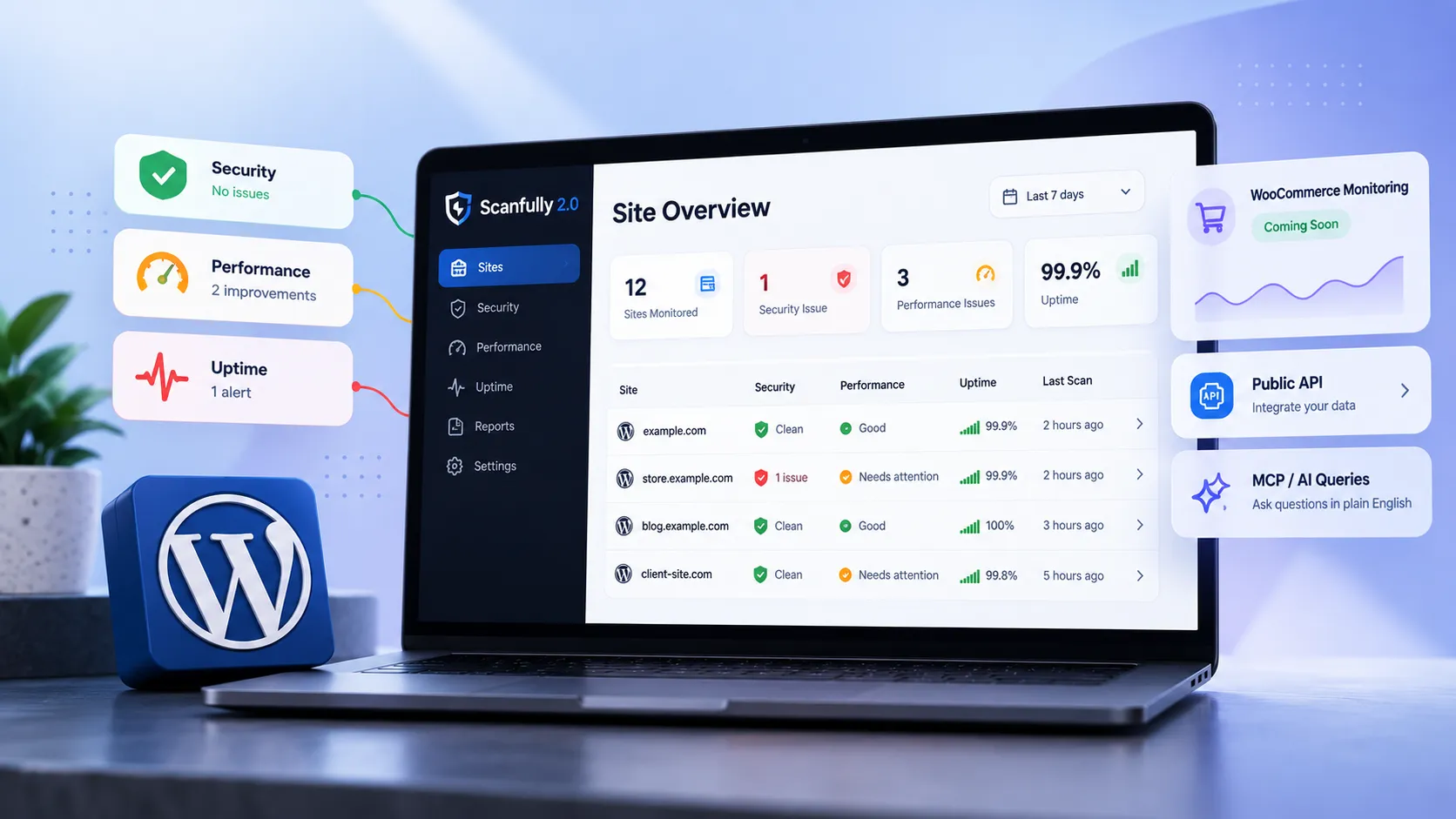
Most WordPress monitoring tools fall into one of two camps: either they overwhelm you with raw data you don’t know what to do with, or they dumb it down so much the alerts are useless. Scanfully 2.0 is making a real attempt to split the difference—and after digging into what version 2.0 actually ships, I think it’s worth a serious look if you’re managing more than a handful of WordPress sites.
Here’s what’s new, what I’d actually use, and where I’d still reach for something else.
1. What Scanfully actually does
Scanfully sits in the “site health monitoring” category—it watches your WordPress installation for security issues, performance regressions, and general health signals, then surfaces those findings in a dashboard rather than burying them in raw logs.
The pitch is that it’s built for the full range of WordPress professionals: freelancers managing a dozen client sites, agencies running hundreds, and hosts who need fleet-level visibility. That’s a wide target, and a lot of tools that try to serve everyone end up serving no one. What’s interesting about Scanfully is that it leans on “human-readable alerts” as a core design principle—the idea being that a site owner who isn’t a developer should understand what’s wrong without needing a translator.
In practice, that means alerts are written in plain English (or close to it) and tied to a recommended action, not just a status code. That alone puts it ahead of most uptime monitors I’ve used.
2. What changed in version 2.0
The headline additions in 2.0 are improved dashboards, a public API, and an MCP (more on that in a moment). But the less-flashy improvement—better alert legibility—is probably the most practically useful upgrade for agencies.
Here’s why that matters: I’ve seen plenty of monitoring setups where the tool flags something, the agency gets an alert, the alert goes into a ticket queue, and by the time someone triages it the client has already emailed asking why their site is slow. The bottleneck is almost never “we didn’t detect the issue.” It’s “we didn’t act on it fast enough because the alert was cryptic.” Human-readable alerts directly compress that gap.
The improved dashboards give you:
- Site-level performance trends over time (not just point-in-time snapshots)
- Security findings grouped by severity, not just listed chronologically
- A multi-site view that actually lets you compare sites at a glance
For anyone managing a WordPress development portfolio, that multi-site view alone changes how you handle morning triage.
3. The public API and MCP angle
The public API is the feature I’m most interested in from an integration standpoint. Monitoring tools that trap data inside their own dashboard are always a compromise—you end up logging into yet another interface, or building custom Zapier chains to get alerts into Slack or your project management tool. A real API means you can pull site health data into wherever your team actually works.
The MCP (Model Context Protocol) integration is the flashier addition. The idea is that you can query your site data using natural language through an AI assistant. Ask something like “which of my sites had the worst performance last week?” and get a coherent answer instead of hunting through a dashboard.
I’ll be honest: I’m cautiously optimistic about this, not enthusiastic. The value of AI-powered queries depends entirely on the quality and completeness of the underlying data. If Scanfully’s data model is solid—and the 2.0 improvements suggest it’s getting there—then the MCP layer could genuinely speed up cross-site analysis. But if the data has gaps, natural language queries just surface those gaps faster. It’s not magic.
4. WooCommerce checkout monitoring
The upcoming WooCommerce checkout and form monitoring add-on is the feature most likely to matter to client work. Checkout monitoring—real synthetic monitoring that actually goes through the checkout flow and alerts you if it breaks—is something most WordPress shop owners don’t have. They find out the checkout is broken when a customer emails them.
This is table-stakes for any serious e-commerce operation, and the fact that it’s coming as a native add-on (rather than requiring a separate tool like Checkly or a custom Playwright script) is genuinely useful. Whether the implementation is shallow (just a ping to the cart page) or deep (full transaction simulation) will determine how much I actually trust it.
Form monitoring has similar value for lead-gen sites. A broken contact form is silent until someone notices leads stopped coming in. Automated form submission checks catch that in minutes, not days.
5. When I’d actually use this on a client site
I manage and audit WordPress sites across a range of client types, and my monitoring stack has always been stitched together: uptime monitoring in one tool, performance tracking in another, security scanning in a third. The appeal of Scanfully 2.0 is consolidation—but consolidation only makes sense if each piece is good enough to replace what you already have.
Here’s where I’d actually reach for it:
- Agency retainer clients where I need a quick way to show the client what’s being monitored and what was fixed last month. The human-readable alerts and clean dashboards make that conversation easier than a raw Wordfence log export.
- Performance-sensitive WooCommerce stores once the checkout monitoring add-on ships. That’s a genuine gap in most monitoring stacks.
- Clients who want visibility without access. The dashboard is readable enough that a non-technical client can log in and understand what they’re looking at. That’s rarer than it should be.
Where I’d hold off:
- Single-site owners who just need basic uptime monitoring. There are cheaper and simpler tools for that use case.
- Deep security audits. Scanfully is a monitoring tool, not a penetration testing tool. If a client has a serious security concern, monitoring is the wrong starting point—a properWordPress site audit that covers both performance and security fundamentals comes first.
- Teams already running Grafana or similar. If you’ve already invested in a proper observability stack, the Scanfully dashboard adds a layer you don’t need. The API might still be useful though.
The honest version of this is: Scanfully 2.0 looks like a genuinely useful tool for the “I manage 10–50 WordPress sites and need one place to see what’s on fire” use case. That’s a real and underserved segment. What I’d want to know before committing to it is how the security scanning depth compares to a dedicated tool like Wordfence or Sucuri, and whether the performance metrics are sourced from real user data or purely synthetic. Those details aren’t clear from the current documentation.
6. The bottom line
Scanfully 2.0 is worth watching—especially if you’re an agency or freelancer who’s tired of stitching together monitoring with five different tools. The public API and the forthcoming WooCommerce checkout monitoring are the features I’d actually build a workflow around. The MCP/AI layer is interesting but not something I’d make a purchasing decision on yet.
If you’re less interested in monitoring tools and more interested in actually improving your site’s performance, the monitoring data is only half the picture. You also need to know what to do with it—which is where a hands-on WordPress speed optimization engagement tends to move the needle faster than any dashboard will.
If you’re evaluating your WordPress monitoring setup or want a second opinion on what’s actually slowing your site down, book a call and we can work through it together.